
Part 2: What’s in a tech pack and why
The sampling page and BOM
This is part two in our blog series on tech packs. Last week we talked about the cover page and why it’s important, if underappreciated. If you missed last’s week’s blog you can catch it here.
This week we’re talking about the next two pages in a tech pack: the sampling page and the BOM.
Just like last week we’ll walk through each feature and talk about why it’s included and how it helps you.
At the end, you’ll have an opportunity to grab a free copy of the tech pack you see here (this is a personal project, I never share client work), as well as a free blank template for you to create your own industry standard tech pack.
Ok, here we go. We’ll take a look at the sampling page first and then I’ll walk you through a BOM.
The sampling page, it’s a short one:
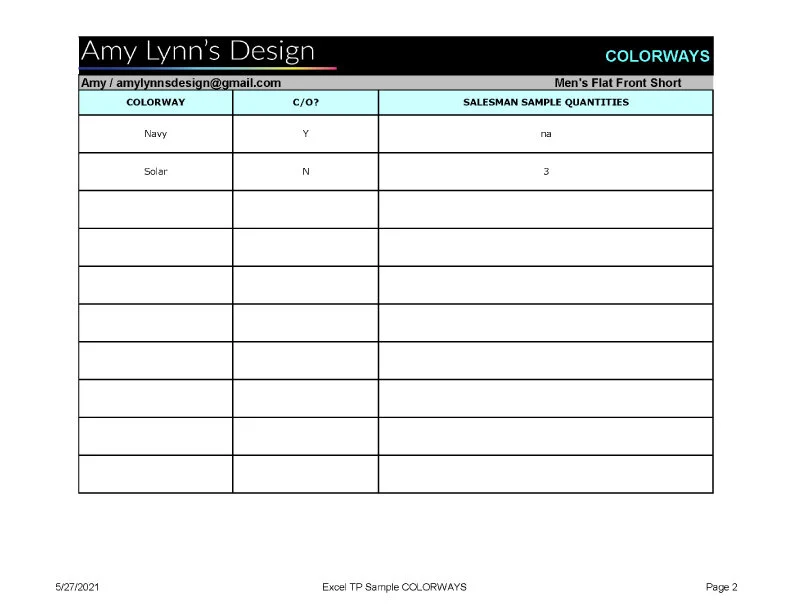
A place to note your colors and samples
The sampling page is short and sweet. This is where you call out the colorways your style comes in, whether the color is new or a carry over (c/o, meaning you’re carrying over a color you’ve run before), and if you’re asking for sales samples in each colorway. The sampling page applies mostly to brands with wholesale accounts who need sales samples, but it can also be useful as a colorway summary page that shows if each color is new or a carry over.
Here you can see I have two colorways, Navy and Solar. Navy is a carry over, meaning I’ve run this color before, and Solar is a new color for this season. I’m asking for no samples in Navy (I already have them from last time), and I’m asking for three sales samples in Solar.
Having this information all in one place is helpful for you and your factory because you can see at a glance what colors you’re running and what samples you need.
Next up, the BOM:

The shopping list for your style
At it’s base, the BOM (bill of materials - usually said “bomb”) tells the factory every single component that goes into your design, how many you need, and what color it should be. This is great information, but the BOM does so much more for you than that.
I know not every brand includes a BOM in their tech packs, and I’m here to say, please, please don’t leave this page out.
Your BOM, along with the rest of your tech pack, puts you in control of your product.
Here are just a few ways the BOM helps you:
It lets your factory accurately price out your design up front. Plan on using a printed pocketing? That costs more than a solid. Using plastic snaps? Those are cheaper than metal. This is important information for your factory to price your garment out correctly up from the start, and it’s all found in your BOM.
It makes counter sourcing easy. The BOM (along with your sketches that we’ll get into later) lets you easily compare pricing at different factories.
It tells your factory which fabrics and trims you’re going with. Did you approve that recycled poly or are you sticking with a non-recycled fabric? Don’t put that information in email where you’re never going to find it again. This is what your BOM is for.
It tells your factory what color each trim should be. Want your zipper to match to your garment? You can’t assume your factory knows that. Want the bartacks to be in a fun contrast color? A BOM is the easiest way to communicate that information.
It keeps your design consistent from season to season. Having a detailed BOM means your factory doesn’t need to remember (or go back and check) to make sure all your trims and colors are the same from one order to the next.
The BOM takes nothing for granted, so your factory doesn’t have to guess, and you’re not surprised by what comes in.
Ok I’m off of my soapbox now and we can talk about the info I don’t put in a BOM:
What’s not included and why
There’s one major thing I don’t include in the BOM:
Trim specs: I don’t include all the information your factory needs to create a trim (for example the shape of a button or font and size of a hangtag) in the BOM. Trims should be separately developed and approved with your factory. Leaving trim development info out of the BOM keeps the tech pack smaller, leaves less room for error, and makes your life easier. If you’re using the same button in five different styles, you don’t want to have to update five different tech packs every time something about the trim changes. That information should be kept in a separate document, called a development card, that we’ll get into in a later blog post.
Grab the tech pack you see here for FREE
As promised, you can grab the tech pack you see here (again this is a personal project, I never share client work), along with a blank template for free by filling out the form below.
You’ll also get weekly blog updates delivered to your inbox each week, along with occasional news and promotions. I never send spam and you can unsubscribe at any time.
That’s it for the sampling page and BOM!
Next week we’ll go into the next page in a tech pack, flat sketches.
Feeling overwhelmed?
Know you need a tech pack for your design but not sure where to start? I love building tech packs. Let me help! Learn more about how my technical design services can help your brand by clicking the button below.
Questions?
Check out the services page to learn more.
Want more help?
Schedule a 30 minute call to discuss your next project.